NPCs
NPCs are the people the GM plays: innkeepers, guards, villains. Each has a public description and private GM notes.
- For the GM
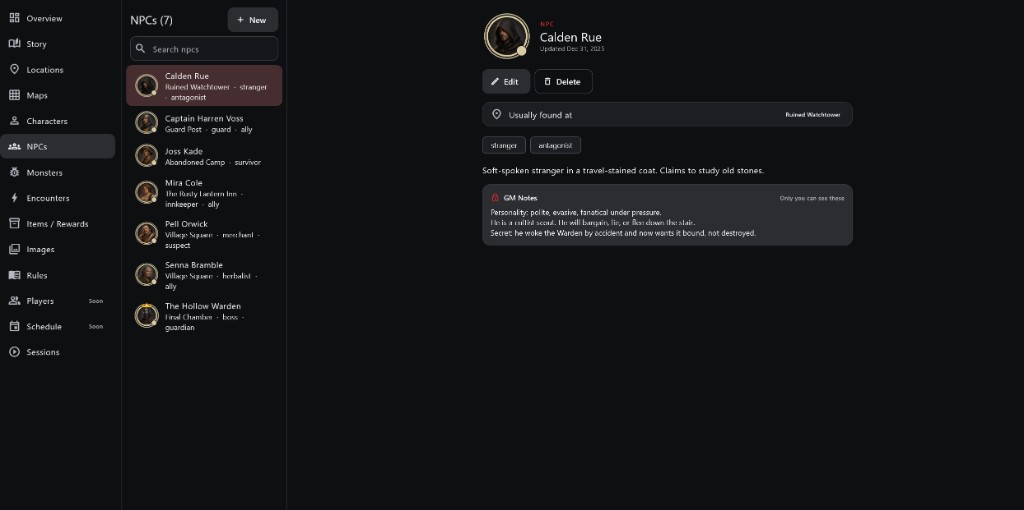
- 1NPC list Each NPC with their usual place and role.
- 2Portrait and name
- 3Usually found at The location the NPC starts in.
- 4Tags and description
- 5GM Notes Personality and secrets. Only the GM sees these.
How to use it
- Open NPCs, pick one or tap + New. Edit changes it; Delete removes it.
- Usually found at links the NPC to a location.
- Tags under the portrait, such as stranger or ally, describe their role so you can find them quickly.
Step by step
- Tap + New and give the NPC a name and portrait.
- Write the public description: what players notice.
- Choose where they are usually found.
- Add tags for their role.
- Write GM Notes: personality, motives and secrets.
GM Notes and Secrets For the GM
- GM Notes are marked "Only you can see these". Players never receive them.
- Put hidden motives and secrets there. To tell players something, say it at the table or use Send Message in the session.
Important rules
- GM Notes are private unless the GM deliberately reveals them.
- Every NPC in a session is controlled by the GM unless lent to a player.
Common questions
Can an NPC fight?
Yes. In a session you can move and act for any NPC; you can also lend one to a player, such as a hired guard.