Starting a Session
A session is one sitting of play. It keeps its own copy of positions, HP, items and turn order, saved as you go.
- For the GM
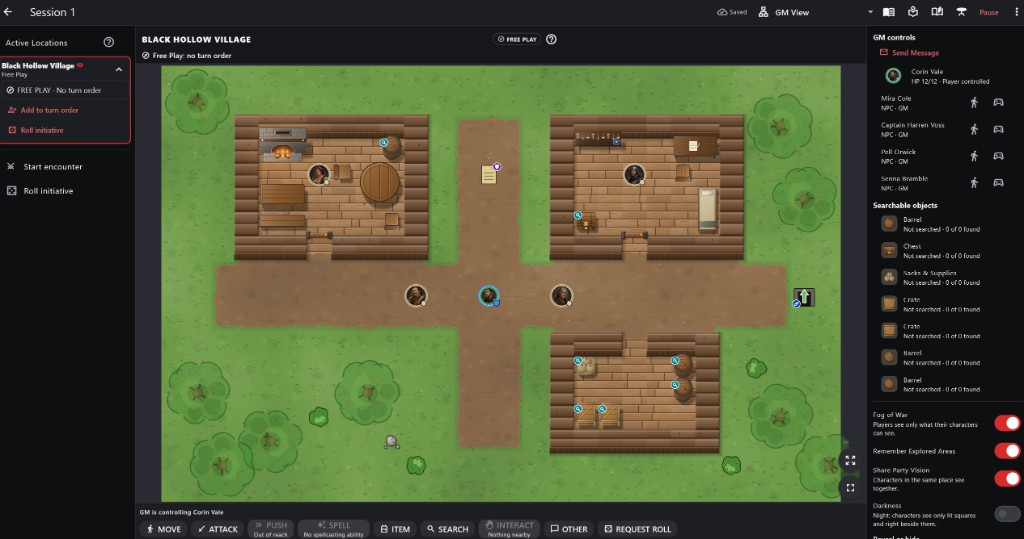
- 1Active Locations Each location in play, its mode, turn order and Start encounter.
- 2Free Play or Combat The location shown and its current mode.
- 3The map Tokens, objects and exits in the location shown.
- 4Action buttons Act for the character you are controlling, or Request Roll.
- 5GM controls Send Message, and who controls each character and NPC.
- 6Searchable objects What can be searched here and what was found.
How to use it
- Tap Start Session at the top of the campaign or in Sessions. A paused session is continued from Sessions.
- The Start Session screen has three steps: Characters, Starting location (and Map), and How you are playing.
Step by step
- Tick the characters who are playing, or Use suggested party.
- Choose the starting location and its map.
- Choose Digital / App-Controlled (everyone plays on a device) or Tabletop / In-Person (real dice and paper; you drive the app).
- Tap Begin. Characters are placed on player start markers or the nearest open space.
- Each player first reads the Player Introduction and taps Continue.
Starting a Session For the GM
- The view menu in the top bar (GM View, or Player: a name) shows exactly what one player sees: their location, map and turn order. It never moves anyone.
- Show Introduction Again (session menu) replays the introduction for everyone or one player.
- Closing the app keeps everything: positions, HP, turn order and who has read the introduction.
- The session never changes your campaign content.
Digital and Tabletop Play
- You can switch between Digital and Tabletop at any time from the session toolbar or menu. Everything carries over.
- Playing over the network? The session is shared on your local network as soon as it opens; see LAN Multiplayer.
Important rules
- Starting a session never changes the campaign; play uses a copy.
- The session saves as you play.
Common questions
Can I run two sessions of one campaign?
Yes. Sessions offers Start another session; each keeps its own state.