Characters
A character page shows one player character: their numbers, skills, weapons, spells, inventory and story. The app works the numbers out from the ruleset.
- For everyone
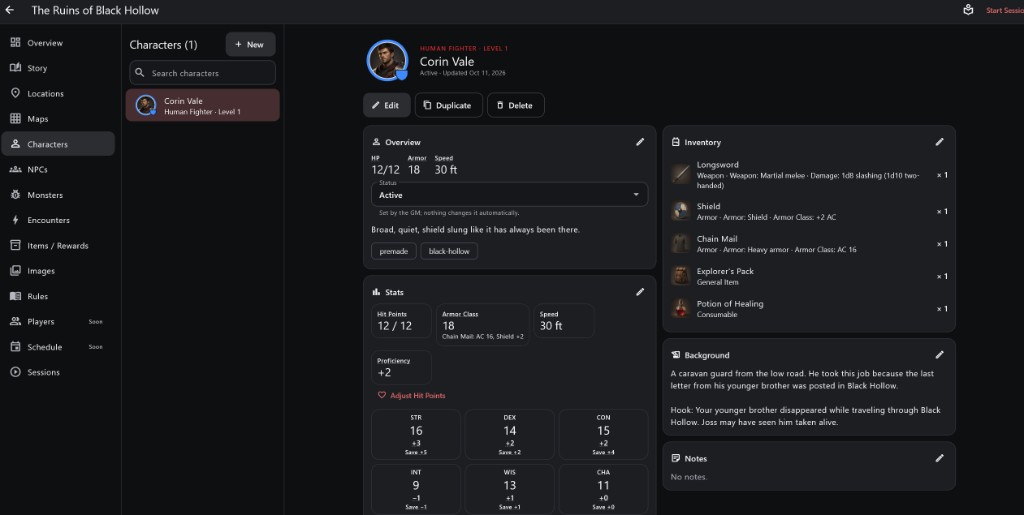
- 1Character list Every character in the campaign; + New creates one.
- 2Portrait and identity Species, class, level and status.
- 3Overview HP, Armor, Speed, Status and tags.
- 4Stats and abilities Hit Points, Armor Class, Proficiency and the six ability scores with their saves.
- 5Inventory Items carried and how many.
- 6Background and Notes The character's story, hook and free notes.
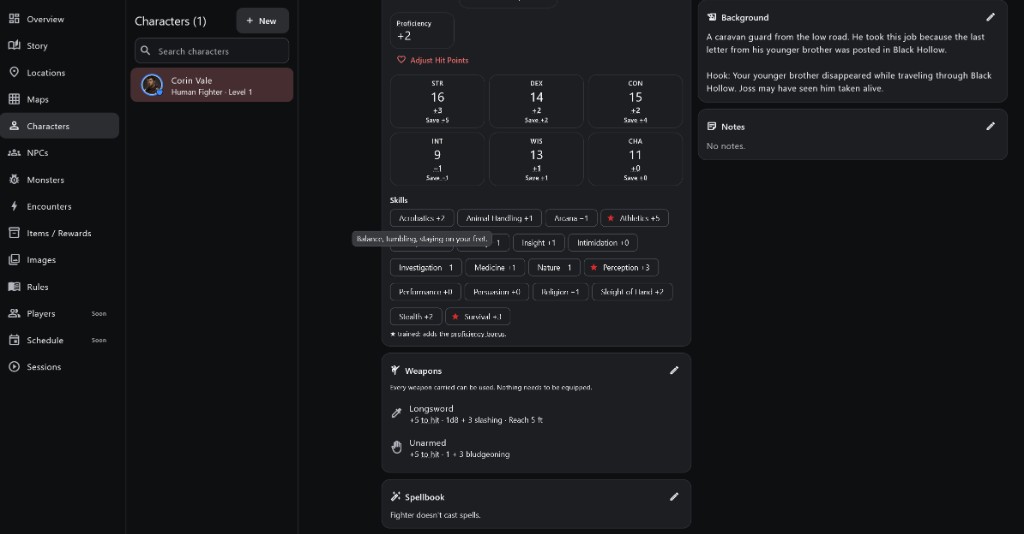
- 1Adjust Hit Points Change the current HP.
- 2Skills Full bonus for each skill; ★ means trained. Hover a skill to see what it covers.
- 3Weapons To hit, damage and reach or range for every weapon carried.
- 4Spellbook Known spells, or a note that the class doesn't cast.
How to use it
Step by step
- Tap + New.
- Follow the creator's steps. For Fantasy RPG these are Play Style, Species, Class, Stats, Skills, Equipment and, for spellcasters, Spells.
- Check the finished page: every number is already filled in.
Stats
- Hit Points: how much harm the character can take. Adjust Hit Points changes the current value.
- Armor Class: how hard they are to hit. The line under it shows where it comes from, such as Chain Mail and a Shield.
- Speed: how far they move in one turn.
- Proficiency: the bonus added to things they are trained in.
Abilities and Saving Throws
- Six ability scores: STR, DEX, CON, INT, WIS and CHA. The big number is the score; the +/- under it is its modifier.
- Save +x is that ability's saving throw bonus, including proficiency when the class is trained in it.
Skills, Weapons and Spellbook
- Skills show their full bonus. A ★ means trained: it adds the proficiency bonus. Hover or hold a skill to see what it covers.
- Weapons lists every weapon carried with its "to hit" bonus, damage and reach or range. Every weapon carried can be used; nothing needs to be equipped.
- Spellbook lists known spells, or says the class doesn't cast spells.
Inventory, Background and Notes
- Inventory lists the items carried and how many. Items come from the campaign's item library.
- Background is the character's story and hook. Notes are free text.
- Status (Active and others) is set by the GM; nothing changes it automatically.
Important rules
- You never type in a bonus: the ruleset calculates it.
- A session uses a copy of the character, so damage taken in play does not change this page.
Common questions
Why can't I edit the Armor Class directly?
It is calculated from armor, shield and abilities. Change the equipment or stats and it updates.
What does "+5 to hit" mean?
Five is added to the d20 when attacking with that weapon.